Guide
Lease Due Date Tracking: Never Miss a Rent or Renewal Date
Updated October 3, 2026 · 6 min read
A lease runs on dates. Rent is due on one. The notice window for renewing, or not renewing, closes on another, usually weeks before you'd think to look. And the end date, the one everybody writes down, may no longer exist: in England, since 1 May 2026, most tenancies simply roll on.
The dates usually live in a PDF you signed once and haven't opened since. This guide covers which dates actually decide things, where each one should live, and how to set rent reminders you won't ignore.
What lease dates does a landlord need to track?
Lease due date tracking comes down to four dates per tenancy: the monthly rent due day, the notice deadline before a renewal or an end, the yearly rent review, and the end date where one still exists. RentDue handles the first, the date that repeats twelve times a year. The other three come round once a year and fit in a phone calendar.
- Rent due day. The one that repeats every month, and the one that slips through repetition: checking starts to feel optional.
- Notice deadline. The last day to tell your tenant you want to change, renew or end the arrangement. This is the date that decides things.
- Rent review date. The day a rent increase can take effect, if your lease and local law allow one. Miss the window and you usually wait another year.
- End date. Written in a US fixed-term lease. In England it no longer applies, which is why the next section exists.
Do leases in England still have an end date?
Most residential leases in England no longer have an end date. Since 1 May 2026, every assured shorthold tenancy has become an assured periodic tenancy that rolls on month by month, and an end date written in an older agreement no longer applies. For a landlord in England, the yearly date worth tracking is the rent increase, which RentDue does not schedule for you.
The rules are set out in GOV.UK's assured periodic tenancies guide for landlords: you can increase the rent only once a year and never in the first year, using form 4A with at least two months' notice, every time, even when your tenant has already agreed. A tenant who wants to leave gives at least two months' notice unless the agreement says less, ending on a rent day or the day before. Wales, Scotland and Northern Ireland have their own rules.
In the US, fixed-term leases with an end date are still common, and the notice and renewal rules are set state by state. The same four dates apply; they just weigh differently:
| Date | US fixed-term lease | England, since 1 May 2026 |
|---|---|---|
| End date | Written in the lease | None: the tenancy rolls on until someone ends it |
| Date that decides | The notice deadline before the end date | The rent increase date |
| Rent increase | Usually at renewal, as the lease and state law allow | Once a year, never in year one, form 4A with two months' notice |
| Tenant leaving | As the lease and state law set | Up to two months' notice, ending on a rent day or the day before |
| Rent due day | Every month, as the lease sets | Every month, as the agreement sets |
Why is the end date the wrong date to track?
The end date is the wrong date to track because, by the time it arrives, the decision has already been made. In a US fixed-term lease, the notice deadline before the end date decides whether the lease renews, ends or carries on month to month. In England since 2026 there is no end date at all, so a calendar built around one tracks nothing.
The usual advice is to diarise the end date. It is the date you can do least about. Put the notice deadline in the calendar instead, with an alert a month before it, because that is when the conversation with your tenant should start. A good tenant asked three months ahead tends to stay; asked three weeks ahead, they may already be looking elsewhere.
How do you set rent due date reminders that work?
A rent reminder works when it arrives before the due day, names the property, and only fires if there is still something to check. If you allow notifications, RentDue sends one reminder per property each month, three days before the due day by default, and only while a unit is still pending. You can move it to the due day itself, or to one or seven days before.
- Set the due day to match the lease. One day for all your properties, and a different one for any property whose lease says otherwise.
- Keep the reminder before the day. A few days ahead lets you check on the due day itself and, if nothing has arrived, send a friendly message on day one or two.
- Mark the month collected when the money lands. Thirty seconds. Once every unit of a property is collected, that property's reminder stops.
- Let overdue months chase you. A month that passes its due day unpaid turns overdue and stays that way until you resolve it.
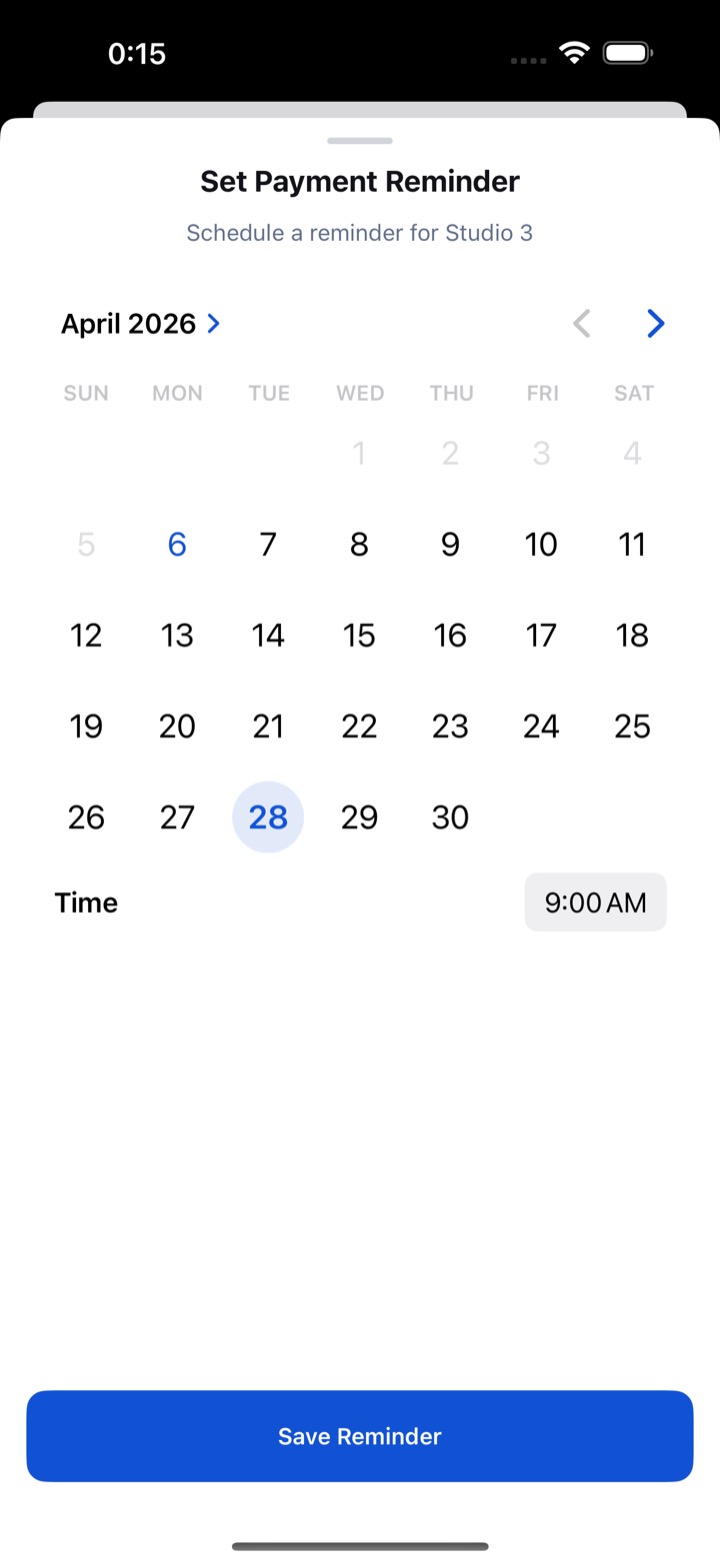
For one unit that needs its own nudge, RentDue also lets you set a one-off payment reminder on the date and time you choose. What to send when a month does go overdue is covered in how to track missed rent payments.
Where should you track lease end dates and notice deadlines?
Lease end dates, notice deadlines and rent review dates belong in your phone calendar, because each comes round once a year and needs one alert well ahead. RentDue does not track lease end dates: there is no field for them and no reminder. For those once-a-year dates, your phone calendar is the better tool, and it is already on your phone.
One habit covers it. The day you sign a lease or agree a rent increase, create the calendar events while the document is still open: the notice deadline with an alert a month before, and the next rent review date. If you want the date next to the property as well, write it in the property's notes in RentDue; it will sit there, but it will not remind you.
Which free tools track lease dates best?
The best free setup for lease dates is a combination: a rent tracker such as RentDue for the monthly cycle, and the phone calendar for the once-a-year dates. A spreadsheet can hold both, but it never speaks up. A notebook holds both and gets lost. Each tool is good at one kind of date:
| Method | Good at | Fails when |
|---|---|---|
| Phone calendar | Once-a-year dates: notice deadlines, rent reviews, end dates | Monthly rent: an event tells you the date came, not whether the money did |
| Spreadsheet | Keeping a record of what was paid | Reminding you of anything; it only answers questions you remember to ask |
| Notebook | Fast notes at the kitchen table | Everything else: no reminders, no totals, easy to lose |
| Rent tracker app | The monthly cycle: due, collected, pending, overdue, with reminders | Once-a-year lease dates, which still belong in your calendar |
Is there a free lease due date tracker?
RentDue is free, with ads, for up to 2 properties with 3 units each, with no account and no bank connection, and the due-day reminders are part of the free plan. Pro removes the limit and unlocks exporting the full year; on the free plan the export covers the last two months as a PDF. The phone calendar covers the remaining lease dates at no cost.
Paid property software adds lease storage and e-signing, which makes sense with dozens of tenancies. With one to a handful, a free rent tracker app plus three calendar entries per tenancy covers every date that matters.
Keep reading: How to Track Missed Rent Payments (Before They Pile Up) · Rent Tracking for Landlords With Just 1 or 2 Properties
Try RentDue
RentDue tracks the rent cycle of every property, due, collected, pending or overdue, and reminds you before the due day. Works offline, no account needed.
Free with ads: 2 properties of up to 3 units each, and exports of the last 2 months. Pro removes the limits and the ads, exports the full year and backs up to your own iCloud or Google Drive.